

Kindle Paperwhite 2024 Review UK: Screen, Battery & Value
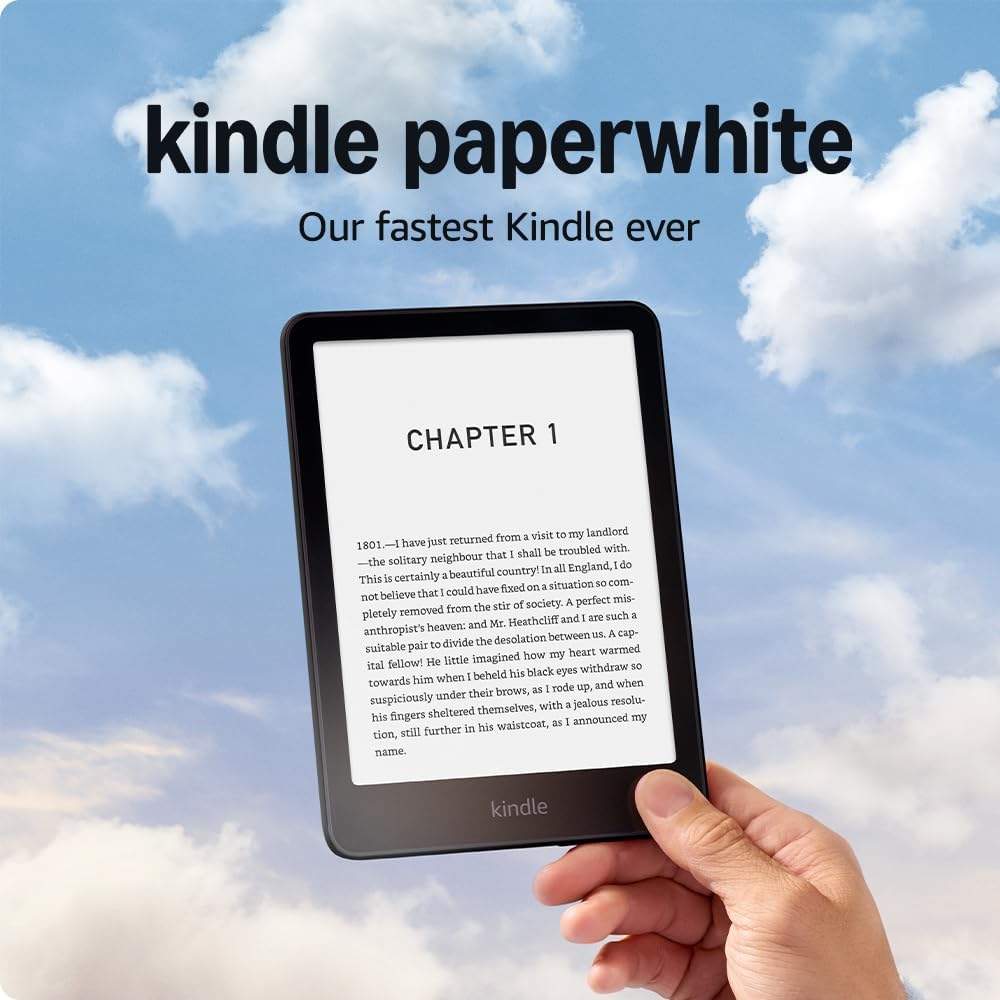
Kindle Paperwhite 2024 is the Kindle we would recommend to most UK readers who want a serious e-reader without paying for the most expensive model. It has a larger 7-inch glare-free display, warm light, waterproofing, USB-C charging, and long battery life, which makes it a clear step up from the basic Kindle.
This Kindle Paperwhite 2024 review UK looks at the screen, battery life, waterproofing, reading comfort, Standard vs Signature Edition differences, Kindle Paperwhite vs basic Kindle comparison, pros, cons, and whether it is worth buying in 2026.
Affiliate disclosure: Some links on this page are affiliate links. See our Affiliate Disclosure. As an Amazon Associate we earn from qualifying purchases.
Quick verdict
The Kindle Paperwhite (2024) is the best all-round Kindle for most UK readers. It gives you a larger glare-free screen, warm light, waterproofing, and excellent battery life without pushing you up to the most expensive Kindle models. It is not the cheapest option, and it is not an essential upgrade for everyone with a recent Paperwhite. But for first-time e-reader buyers and people moving from an older Kindle, it is usually the safest choice.
Quick Verdict: Is the Kindle Paperwhite 2024 Worth Buying?
Yes, the Kindle Paperwhite 2024 is worth buying if you read often and want a better screen, waterproofing, warm light, and longer comfort than the basic Kindle gives you. It is the best middle-ground Kindle for most UK buyers because it feels premium without moving into Oasis-style or colour-reader pricing.
It is less urgent if you already own a recent Paperwhite and are happy with it. The 2024 model is a useful upgrade, but not a must-buy replacement for every 2021 Paperwhite owner. It makes the most sense for first-time Kindle buyers, older Kindle owners, and regular readers who want one dependable e-reader for home, travel, commuting, and holidays.
Kindle Paperwhite 2024 at a Glance
| Detail | Info |
|---|---|
| Product type | E-reader |
| Display | 7-inch glare-free E Ink display |
| Resolution | 300ppi |
| Storage | 16GB on the standard model |
| Waterproofing | IPX8 |
| Charging | USB-C |
| Audio | Audible support through Bluetooth headphones or speakers |
| Best for | Regular reading, travel, commuting, holidays, novels, non-fiction, and long-form ebooks |
| Not ideal for | Colour comics, heavy PDF use, or buyers who mainly want library borrowing outside Amazon’s ecosystem |
Best For
- UK readers who want the best all-round Kindle
- People who read novels, non-fiction, memoirs, and long-form ebooks
- Readers who want a bigger, more comfortable screen than the basic Kindle
- Travel, commuting, holidays, and long battery-life use
- Anyone upgrading from an older Kindle model
Not Ideal For
- Buyers who only want the cheapest Kindle
- People already happy with a recent Paperwhite
- Readers who mainly want colour for comics, magazines, or illustrated books
- Anyone who prefers Kobo-style library borrowing support
- Users who need a tablet-like device for apps, browsing, and video
What Changed in the 2024 Kindle Paperwhite?
The 2024 Paperwhite improves the reading experience rather than changing what a Kindle is. The biggest changes are the larger 7-inch screen, smoother general feel, and better comfort for people who read often. These are not flashy upgrades, but they matter when you use the device every day.
- Larger screen: the 7-inch display gives you more reading space without making the device feel like a tablet.
- Smoother use: page turns and menu movement feel quicker than on older models.
- Comfortable warm light: useful for evening reading, especially if you do not like a harsh white screen at night.
- Still waterproof: useful for baths, poolsides, holidays, and general peace of mind.
- USB-C charging: easier to live with than older Kindle charging setups.
Display and Reading Comfort
The display is the main reason to choose the Paperwhite over the basic Kindle. The screen is larger, sharp at 300ppi, and easier to read for long sessions. For novels, non-fiction, biographies, business books, and general long-form reading, this is where the Paperwhite feels worth the extra cost.
The glare-free screen also makes a big difference outdoors. Reading on a phone or tablet in bright light can become annoying very quickly. The Paperwhite is much better for gardens, trains, parks, beaches, and travel days where you do not want screen glare ruining the experience.
The warm light is another practical feature. It makes night reading softer and less clinical than a plain white-lit screen. If you read in bed, this is one of the clearest reasons to choose Paperwhite instead of the cheapest Kindle.
Battery Life
Battery life is one of the Paperwhite’s best everyday advantages. This is not a device you expect to charge every night. For typical reading use, battery life is measured in weeks rather than days, although the exact result depends on brightness, wireless use, Bluetooth audio, and reading time.
That matters because a Kindle feels best when it disappears into your routine. You can leave it in a bag, take it on a trip, or use it before bed without treating it like another phone that constantly needs charging.
Waterproofing and Travel Use
The IPX8 waterproofing is one of the most useful Paperwhite features. It does not mean you should treat the device carelessly, but it does add peace of mind around baths, pools, kitchens, wet bags, and holidays.
For travel, the Paperwhite is also much easier than packing several books. The 16GB standard model is enough for most readers because ebooks are usually small. Unless you plan to store a large audiobook library, the standard storage is already practical.
Pros and Cons
Pros
- Excellent all-round reading experience
- Larger and more comfortable screen than the basic Kindle
- Sharp 300ppi text
- Warm light is useful for evening reading
- Waterproofing adds real flexibility
- Long battery life is a major practical advantage
- USB-C charging is convenient
- Strong pick for first-time e-reader buyers
Cons
- Costs noticeably more than the basic Kindle
- Not a necessary upgrade for every recent Paperwhite owner
- No colour display
- No physical page-turn buttons
- Kindle ecosystem will not suit every reader equally
- Library borrowing support is less flexible than on some Kobo alternatives
Who Should Buy the Kindle Paperwhite 2024?
Buy it if:
- You want the best Kindle for regular everyday reading
- You are buying your first serious e-reader
- You read novels, non-fiction, and long-form text often
- You want a better screen than the basic Kindle gives
- You read near water, outdoors, on trains, or while travelling
Skip it if:
- You already own a recent Paperwhite and are happy with it
- You only want the cheapest Kindle for occasional reading
- You mainly read colour comics, magazines, or graphic-heavy books
- You strongly prefer library-focused alternatives like Kobo
Kindle Paperwhite vs Basic Kindle
The basic Kindle is still a good e-reader, especially if price matters most. But the Paperwhite is better for people who read often because the screen, warm light, waterproofing, and general comfort make a bigger difference over time.
| Feature | Kindle Paperwhite 2024 | Basic Kindle |
|---|---|---|
| Screen size | Larger 7-inch display | Smaller display |
| Text sharpness | 300ppi | 300ppi |
| Warm light | Yes | No |
| Waterproofing | Yes | No |
| Reading comfort | Better for frequent readers | Fine for lighter use |
| Best for | Regular reading and travel | Budget buyers and occasional readers |
Verdict: The Paperwhite is the better long-term buy for regular readers. The basic Kindle still makes sense if you only read now and then or want the lowest entry price.
Standard vs Signature Edition
Most UK buyers should start with the standard Kindle Paperwhite. It already gives you the main things that matter: the larger screen, warm light, waterproofing, USB-C, and enough storage for a large ebook library.
| Feature | Standard Paperwhite | Signature Edition |
|---|---|---|
| Storage | Enough for most readers | More storage |
| Auto-adjusting light | No | Yes |
| Wireless charging | No | Yes |
| Best for | Most buyers | People who want the extra convenience features |
| Value | Usually stronger | Better if discounted or if you need the extras |
Verdict: The standard version is enough for most people. The Signature Edition is worth considering if you specifically want auto-adjusting light, wireless charging, and extra storage.
Kindle Paperwhite for Audiobooks and ePub Files
The Paperwhite supports Audible through Bluetooth headphones or speakers. That is useful if you already use Amazon’s audiobook ecosystem, but it is not the same as having a built-in speaker.
For ePub files, Kindle works best through Amazon’s Send to Kindle system, which can convert compatible files for Kindle reading. It is not as open and library-focused as some Kobo models, so buyers who mainly use non-Amazon ebook sources should compare both ecosystems before choosing.
Where to Buy in the UK
The Kindle Paperwhite 2024 is sold on Amazon.co.uk and often becomes more attractive during Amazon device sales. If the price drops, it is one of the strongest e-reader buys for UK readers who want a comfortable, waterproof, long-life Kindle.
Final Verdict
The Kindle Paperwhite 2024 is the safest Kindle recommendation for most UK readers. It gives you the features that matter in daily reading: a larger sharp screen, warm light, waterproofing, USB-C charging, and excellent battery life.
It is not the cheapest Kindle, and it is not a must-upgrade for everyone with a recent Paperwhite. But if you are buying your first proper e-reader or replacing an older Kindle, this is the model that gets the balance right.
Frequently Asked Questions
Is the Kindle Paperwhite 2024 waterproof?
Yes. The Kindle Paperwhite 2024 has IPX8 waterproofing, which is one of the main practical reasons many readers choose it over the basic Kindle.
Is the Kindle Paperwhite better than the basic Kindle?
For regular readers, yes. The Paperwhite has a larger screen, warm light, waterproofing, and a more comfortable reading feel. The basic Kindle is better if price matters most.
How long does the Kindle Paperwhite battery last?
Battery life is one of the Paperwhite’s strongest points. For typical reading use, it is designed to last for weeks rather than days, although brightness, wireless use, Bluetooth audio, and reading time affect the result.
Should I upgrade from the 2021 Kindle Paperwhite?
Not automatically. If your 2021 Paperwhite still works well, the 2024 model may not feel like a necessary upgrade. It makes more sense if you are upgrading from an older Kindle or your current device needs replacing.
Can Kindle Paperwhite read ePub files?
Yes, but usually through Amazon’s Send to Kindle system, which converts compatible ePub files for Kindle reading. If you want the most open ebook format support, it is worth comparing Kindle with Kobo before buying.
Does Kindle Paperwhite support audiobooks?
Yes. The Kindle Paperwhite can play Audible audiobooks through Bluetooth headphones or speakers. It does not have a built-in speaker.
Is the Kindle Paperwhite Signature Edition worth it?
For most buyers, the standard Paperwhite is enough. The Signature Edition is worth considering if you want extra storage, wireless charging, and auto-adjusting light.